Building with Claude Code: What AI Collaboration Actually Looks Like
“Can you solve this with AI somehow?”
My partner paints. But she doesn’t have a studio. No clean walls, no good lighting. When she finishes a painting, buyers can’t imagine how it would look in their home.
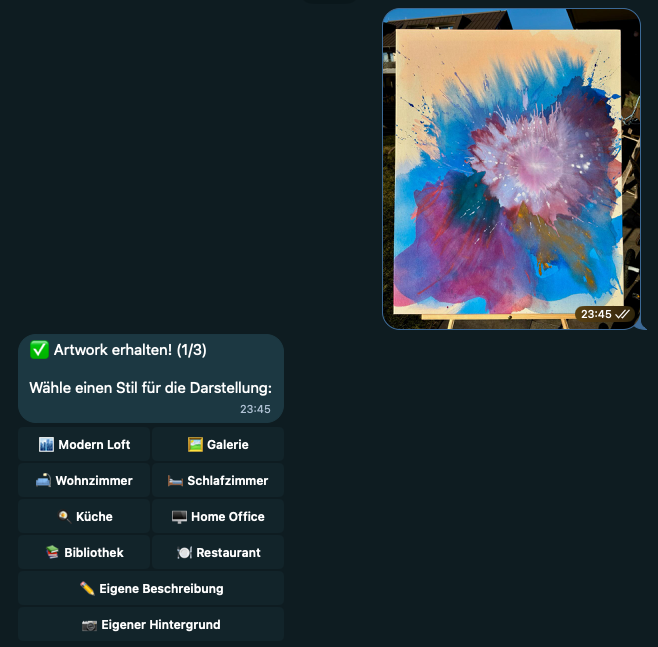
I knew what I wanted: a Telegram bot where you upload artwork, pick a room, get a visualization. Simple enough concept. But I didn’t write a single line of code myself.
47 commits later, I had a working product. And a much clearer picture of what it means to build software with an AI collaborator.
What is Claude Code?
For those who haven’t used it: Claude Code is Anthropic’s commandline tool that lets you work with Claude directly in your terminal. It can read your codebase, write files, run commands, debug errors. Think of it less as autocomplete and more as a developer you’re pair programming with.
The difference from chat-based AI: Claude Code has context. It sees your entire project. When I say “the Telegram handler is broken,” it knows which file I mean.
The First 4 Hours
December 28th, around 8pm. I told Claude what I wanted: a Telegram bot using Google’s image generation API. The concept was simple: upload a photo of artwork, visualize it hanging in any room. That was my first input. Claude proposed a structure, I agreed, Claude wrote the code.
By midnight, the bot was live on Cloudflare and responding to Telegram messages. But the output wasn’t what I expected. I had tested Google’s image generation model in AI Studio before, and those results looked different. Something was off. Still, in just a few hours, I had a working bot that people could actually call.
Here’s what that looked like in practice. I would describe the user flow as precisely as possible: “Users should be able to select from different room presets.” Then I’d switch to plan mode in Claude Code and discuss the approach until I was satisfied with the plan. Only then would Claude implement it. I’d test the feature immediately after.
The decisions were still mine. Which rooms to include. What the user flow should feel like. How error messages should read. But the implementation was Claude’s.
Then I Hit a Wall
The next day, I wanted better image quality. The visualizations looked off. The artwork didn’t blend naturally into the rooms.
This is where the collaboration got interesting.
I spent 3-4 hours debugging. I was convinced something was wrong with my implementation. The prompt structure, the resolution, the image format. I kept asking Claude to tweak things. Claude kept tweaking. Nothing helped.
At some point I genuinely thought: this isn’t going to work.
Then I stepped back and asked a different question. Not “fix this code” but “is Imagen 3 even the right model for this use case?”
Claude explained the differences between Imagen 3 and Gemini 3 Pro Image. Gemini handles image-to-image tasks differently. Better at compositing. I made the decision: switch to Gemini. Claude rewrote the integration.
Still didn’t work. Permissions issue in Google Cloud Console. Claude couldn’t fix that, I had to dig through the console myself. One config change later, everything clicked.
And here’s the thing: the switch to Gemini accidentally unlocked a feature I hadn’t planned. Custom background upload. Users can now send their own room photo instead of using presets. That wouldn’t have been possible with Imagen. Claude noticed this and suggested we build it in. I agreed.
The Real Test
The bot worked. But sometimes it didn’t respond. Users would send an artwork, wait, and nothing would happen. Timeout errors. 524s everywhere.
I described the problem to Claude. Claude identified it immediately: Grammy, the bot framework, has a 30-second CPU limit. Gemini needs up to 60 seconds for image generation. The math doesn’t work.
I asked: “What are my options?”
Claude proposed three approaches. Queue the requests to an external service. Switch to a different hosting platform. Or use Cloudflare Durable Objects, which have a 5-minute CPU limit instead of 30 seconds.
I didn’t know about Durable Objects before this. Claude explained them. I made the call: we’re doing Durable Objects.
What followed was the cleanest part of the collaboration. Claude proposed breaking the migration into 5 phases. I agreed. Each phase: Claude writes the code, I deploy, I test, we move to the next phase. 1055 lines added, 710 removed. Grammy gone. Five handler files deleted. The whole thing took about 2 hours.
I expected this to be a nightmare. It wasn’t.

What I Did vs What Claude Did
Let me be honest about the division of labor.
Claude wrote all the code. Every function, every handler, every API call. Claude proposed the Durable Objects architecture. Claude suggested Gemini over Imagen. Claude structured the phased migration.
I identified the problem. When the images looked wrong, I noticed. When the bot timed out, I noticed. When the SQLite storage exploded (Cloudflare’s 128KB limit per value, I was storing images as base64), I noticed.
I asked the questions. Not “write this function” but “what are my options here?” Not “fix this bug” but “is this even the right approach?”
I made the decisions. Gemini over Imagen. Durable Objects over external queues. Phased migration over big bang rewrite. When to ship, when to keep iterating.
I tested. Every change, I ran the bot. Sent test images. Checked the results. Caught problems before they reached users.
I knew when it was good enough. Claude could have kept proposing improvements forever. I decided when to stop.
What This Actually Means
I’m not a backend developer. I’ve never built a Telegram bot before. I didn’t know what Durable Objects were. Three years ago, this project would have taken me weeks, if I’d finished it at all.
With Claude, it took a weekend. And the quality is higher than what I would have produced alone.
But here’s what I learned about AI collaboration: the human work doesn’t disappear. It shifts. Less typing, more thinking. Less syntax, more strategy. Less implementation, more judgment.
The questions you ask matter more than the code you write. “Fix this” produces worse results than “what are my options here?” Giving Claude context about why you want something produces better results than just describing what you want.
And there are things Claude can’t do. Debug a Google Cloud Console permissions issue. Decide if the image quality is “good enough.” Know when to ship. Those stayed with me.
What’s Next
The bot works. My partner uses it. Currently whitelist-only. Will I make it public? Maybe. First I want to test if the quality holds up for different art styles.
What I’m more interested in: how this way of building software scales. This was a weekend project. What happens when the stakes are higher? When the codebase is larger? When you’re collaborating with Claude and other humans at the same time?
I don’t have answers yet. But I’m going to keep experimenting.
Code isn’t public, but if you have questions: Twitter/X